Edit videos automatically from a Google Drive folder
Raw2Reel can work from a Google Drive folder you share with it. Every video you or your team put in that folder is picked up and edited by itself: pauses and retakes cut, captions, music and b-roll added. When you download a finished video, it also lands in a Done & Ready folder inside your folder. Watching the edits is free with no card; you pay only to download.
Set it up once
Make and share a folder
In Google Drive, make a folder for your raw videos and share it with hello@raw2reel.com as Editor.
Paste the link in Raw2Reel
Under Videos, tap Connect your Google Drive folder, paste the link, pick the language you speak and tap Connect folder.
Drop videos in the folder
Each one shows up in Raw2Reel and is edited by itself. Watch it free; download with a plan or pack and it also lands in Done & Ready.
Raw2Reel with Google Drive: the facts
| What it does | Picks up every video put in one shared Google Drive folder and edits it by itself: cuts pauses, ums and repeated takes, adds word-by-word captions, music, b-roll and auto zoom. |
|---|---|
| How to connect | In Videos, tap Connect your Google Drive folder. Share a Drive folder with hello@raw2reel.com as Editor, paste its link and pick the spoken language. Sub-folders named Arabic, English or Danish use that language. |
| Where files go | Videos you download also go into Done & Ready inside your folder. The raw video moves to Original done. |
| Price to try | $0 and no card. Upload a clip, let it edit, and watch your full edit in the preview. |
| Price to download | Starter pack: 5 videos for $12, one time. Monthly: 15 videos a month for $15, cancel any time. Yearly: 15 videos a month for $120 a year ($10 a month). Packs with no subscription: 10 videos for $29 or 30 for $69. Card payment via Stripe. Other countries see a local price in the app. |
| What counts as a video | A video counts once, the first time you download it, whatever its length. Downloading it again after changes does not count again. Clean up sound (background noise removal) counts 1 more video. |
| Languages | 90+ spoken languages recognised automatically. Captions can be translated into 7 languages: English, Arabic, Danish, Spanish, French, German and Swedish, or shown in two languages at once. The app itself is in English, Arabic and Danish. |
| Length limits | Any length. A talking video longer than 3 minutes comes back as 5 to 10 short clips, best first, each fully edited. Each clip you download counts as one video. |
| Formats and quality | Upload MOV or MP4. Out: vertical 9:16, 4:5 feed, square 1:1 or landscape 16:9. Downloads are Full HD 1080p with no Raw2Reel mark. |
| Measured speed | Own test, 17 Nov 2026: a 30 s clip was edited 43 s after upload. Job log, 6-13 Nov 2026: clips up to 3 min reached a finished preview in a median 33 s after pressing Edit, 9 in 10 within 75 s. |
| Works on | Any browser on iPhone, Android or a computer. No app to install. |
Checked 18 November 2026 in the app and the price table.
Connecting a Google Drive folder, step by step
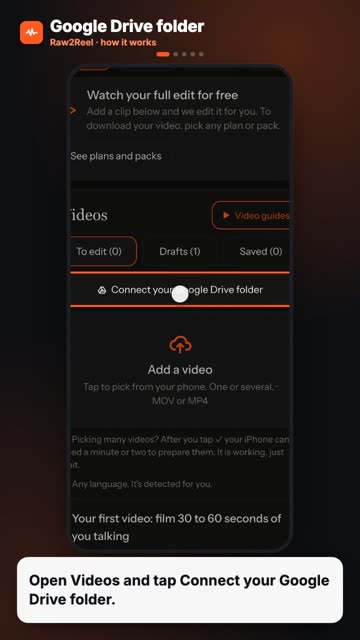
1. Open Videos and tap Connect your Google Drive folder. Above it you see the rule for new accounts: watch your full edit for free, pick a plan or pack to download.
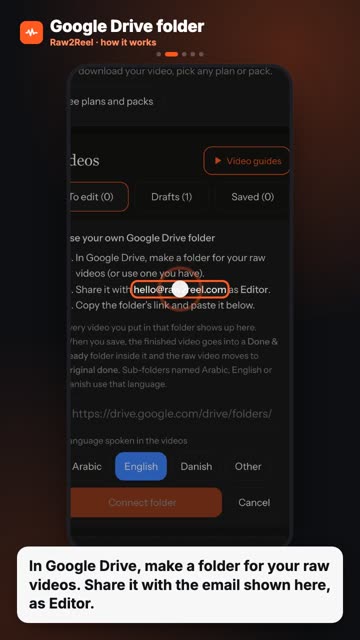
2. In Google Drive, make a folder for your raw videos and share it with the email shown, hello@raw2reel.com, as Editor.
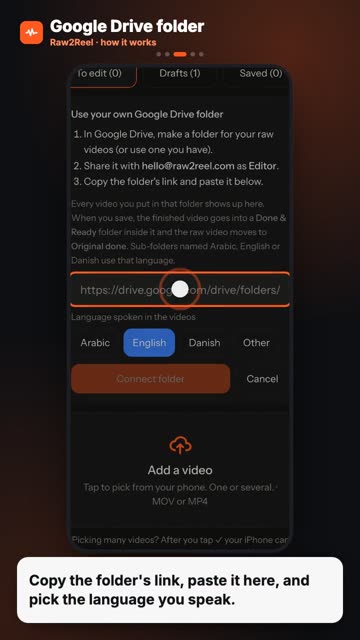
3. Copy the folder's link, paste it in the box and pick the language you speak in the videos.
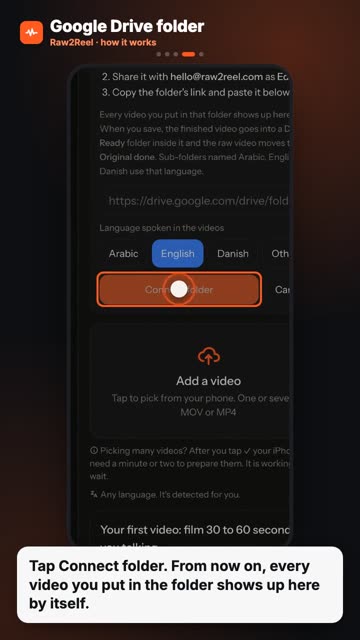
4. Tap Connect folder. From now on, every video you put in the folder shows up here by itself.
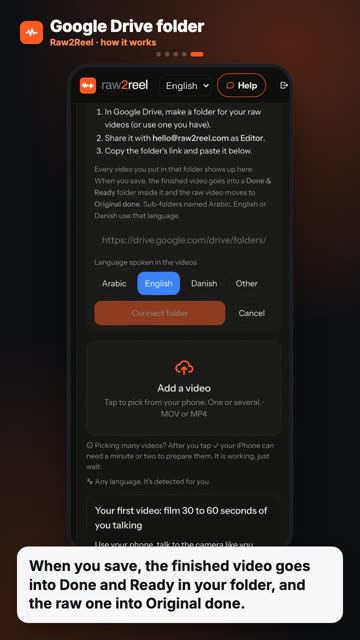
5. When you download a video, the finished file goes into Done & Ready in your folder, and the raw one into Original done.
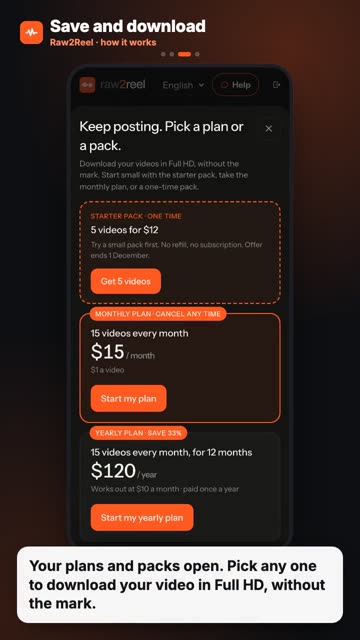
6. To download, pick a plan or pack: 5 videos for $12 once, 15 a month for $15, or $120 a year. Downloads are Full HD without the mark.
How the folder works
You share one Drive folder with hello@raw2reel.com as Editor and paste its link in Raw2Reel. From then on, every video put in that folder is picked up and edited by itself, in the language you picked; sub-folders named Arabic, English or Danish use that language instead. The raw video moves to Original done, so the main folder only holds what still needs editing. The full guide with screenshots.
Good for teams
Anyone who can add files to the folder can drop clips in: a camera person, an assistant or a client. They add from the Google Drive app on their own phone or computer, and the edits wait for you in Raw2Reel. Once you download a video, they find it in Done & Ready without you sending anything.
The same edit as an upload
Clips from Drive get the full edit: pauses and retakes cut, word-by-word captions in 5 styles, music, b-roll from your own pictures first and auto zoom. A talking video over 3 minutes comes back as 5 to 10 short clips, best first.
What access Raw2Reel gets
Only the folder you share with hello@raw2reel.com, nothing else in your Drive. To stop, remove that email from the folder's sharing.
Price: watch free, pay to download
The Drive folder costs nothing extra. Watching your edits is free with no card. Downloading needs a plan or a pack: 5 videos for $12 once, 15 a month for $15, $120 a year, or 10 for $29 and 30 for $69 with no subscription. How downloading works.
More you can do with Raw2Reel
Questions
Can I edit videos directly from Google Drive?
Yes. Share a Drive folder with hello@raw2reel.com as Editor and paste its link under Videos. Every video you put in the folder is picked up and edited by itself.
Is it free?
Trying it is: the folder, the edits and watching them cost nothing and need no card. Downloading needs a plan or pack, from $12 for 5 videos. Accounts made before 17 November 2026 keep 3 free videos a month (720p with a small mark).
Do I need to upload my videos in Raw2Reel?
No. Put them in the shared folder from the Google Drive app on your phone or computer, and Raw2Reel takes them from there.
Where do the finished videos go?
When you download a video, it goes into Done & Ready inside your folder in Full HD 1080p with no mark. The raw clip moves to Original done.
Can my team add videos to the folder?
Yes. Anyone who can add files to the folder can drop clips in, and they show up in your Raw2Reel.
How fast is the edit?
In our test on 17 November 2026, a 30-second clip was ready 43 seconds after upload. In the job log for 6 to 13 November 2026, clips up to 3 minutes reached a finished preview in a median 33 seconds.
Can Raw2Reel see the rest of my Drive?
No. It only sees the folder you share with hello@raw2reel.com.
Can you edit or trim videos in Google Drive itself?
Not in Drive's own player, which is for watching. Google's help points to Google Vids for that: on a computer you open the video from Drive in Vids to trim it, add music or make other simple edits by hand (checked 23 November 2026). Raw2Reel is the automatic way: it takes the videos from the folder you share and does the cutting, captions and music for you.
Is Raw2Reel an online Google Drive video editor?
Yes, in this sense: it runs in the browser with nothing to install, and it edits the videos in the Drive folder you share. It is not a timeline inside Drive. The edit is automatic, and you change it by tapping words or typing what you want.
How do I edit a video from Google Drive on an iPhone?
Add the video to the shared folder from the Google Drive app on your iPhone. Raw2Reel edits it by itself. Then open raw2reel.com in your browser to watch it, change it and download it. There is no app to install.
Does Raw2Reel give out raw footage to practise editing?
No. Raw2Reel edits your own videos. It does not offer practice footage or footage packs. If you film a short clip of yourself talking, you can watch it edited for free and compare the cuts with your own.